What Logitech G Hub does
G Hub is Logitech's all-in-one configuration tool for their gaming peripherals. It handles mouse remapping, DPI adjustment, RGB lighting control, macro recording, profile management, and firmware updates for Logitech mice, keyboards, headsets, and webcams. It's a powerful piece of software — when it works.
The problem is that G Hub tries to do everything for every Logitech device. For users who just want reliable mouse remapping and a simple way to record macros, that's a lot of overhead. And it only works with Logitech hardware.
Where G Hub falls short
G Hub has a well-documented reputation for stability problems. Users regularly report that GHub crashes on startup, fails to detect devices after waking from sleep, loses profile settings after updates, and consumes significant CPU and memory in the background. A quick search turns up years of forum posts about G Hub not loading, freezing, or conflicting with games.
Beyond stability, there are some fundamental limitations to how G Hub handles mouse remapping:
- Logitech-only: G Hub only works with Logitech mice. If you switch brands or use a second mouse from a different manufacturer, your remapping configuration doesn't follow.
- No click cadence actions: G Hub lets you remap buttons one-to-one — one button, one action. There's no way to assign multiple distinct actions to the same button based on click patterns.
- Heavy installer: G Hub requires a large download, installs background services, and often demands a Logitech account for cloud sync features most users don't need.
- Complicated UI for simple tasks: The interface is designed around DPI curves, LIGHTSYNC effects, and device ecosystems. If you just want to remap a side button to Ctrl+Z, you have to navigate through layers of UI that don't apply to you.
What MouseKey does differently
MouseKey is built for one thing: making any mouse button do more. It's a dedicated mouse remapping tool with a built-in hotkey recorder that works with every mouse brand on Windows.
MouseKey works with any mouse
MouseKey operates at the system level, intercepting mouse input regardless of brand, model, or driver. Logitech, Razer, Corsair, SteelSeries, a $10 office mouse — MouseKey doesn't care. If your mouse has buttons, MouseKey can remap them. This is the biggest functional difference from G Hub, which is locked to Logitech hardware.
MouseKey gives you 5 actions per button
This is something G Hub simply cannot do. MouseKey's click cadence system assigns a different action to 1, 2, 3, 4, and 5 rapid clicks on any single button. That means a standard three-button mouse gives you up to 15 programmable shortcuts — all from buttons that G Hub would treat as single-action only.
MouseKey has a built-in hotkey recorder
MouseKey includes a simple macro recorder called "Create Hot Key." Select it from any action dropdown, and MouseKey starts recording your keyboard input. Press any shortcut — Ctrl+C, Alt+Tab, Win+D, or any combination — and MouseKey captures it as a replayable action. You can also record text strings that get typed out when triggered. The recording process takes seconds, and the recorded macro is saved directly to your profile.
G Hub also has a macro recorder, but it's buried inside a more complex interface alongside DPI settings, lighting configuration, and device-specific menus. For users who just want to record a keyboard shortcut and assign it to a mouse button, MouseKey's recorder is faster and more direct.
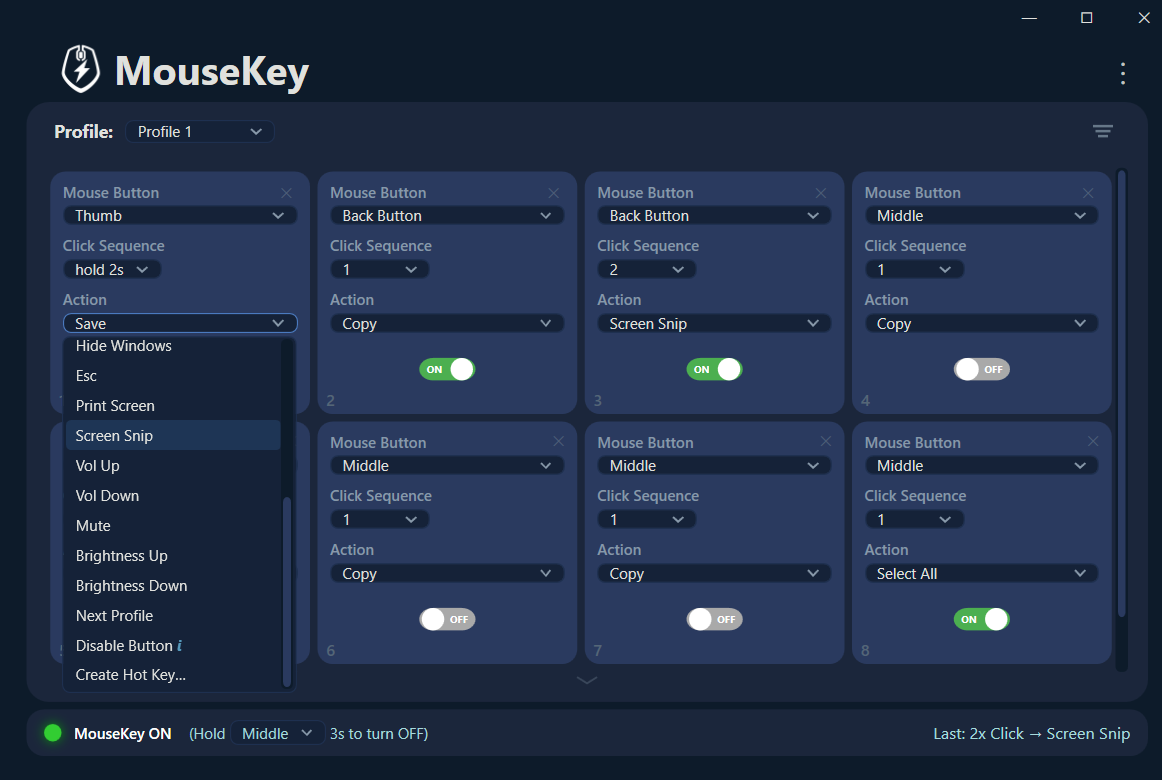
Feature comparison: MouseKey vs Logitech G Hub
Here's how MouseKey and G Hub compare on the features that matter most for mouse remapping:
| Feature | MouseKey | Logitech G Hub |
|---|---|---|
| Works with any mouse brand | ✓ Any mouse | ✗ Logitech only |
| Mouse button remapping | ✓ Any button | ✓ Logitech buttons |
| Multi-action click cadences | ✓ Up to 5 per button | ✗ Not available |
| Macro / hotkey recorder | ✓ Built-in recorder | ✓ Built-in recorder |
| Text string recording | ✓ Yes | ✗ No |
| Profiles | ✓ Multiple profiles | ✓ Per-app profiles |
| DPI / sensitivity control | ✗ Not included | ✓ Yes |
| RGB lighting control | ✗ Not included | ✓ Yes |
| Setup time | Under 1 minute | 5–15 minutes |
| Account required | ✓ No account | ✗ Logitech account |
| Works offline | ✓ 100% offline | ✓ After setup |
| Telemetry / analytics | ✓ Zero | ✗ Sends data |
| System resource usage | Minimal | Heavy |
| Known stability issues | ✓ Stable | ✗ Widely reported |
Note: G Hub offers features MouseKey doesn't — like DPI adjustment and RGB lighting. If you need those features specifically for Logitech hardware, G Hub is the right tool. MouseKey is focused entirely on mouse remapping, macro recording, and click cadence actions.
Who should consider switching from G Hub to MouseKey
MouseKey isn't trying to replace every feature in G Hub. It's a better fit if you fall into one of these categories:
- You don't use a Logitech mouse — MouseKey works with any brand, so you get the same mouse remapping and recording capabilities regardless of hardware.
- You use multiple mouse brands — instead of running G Hub for your Logitech and Synapse for your Razer, MouseKey handles all of them in one lightweight app.
- You're frustrated with G Hub crashes — MouseKey is a single, lightweight application with no background services, no cloud sync, and no history of update-breaking stability issues.
- You want more actions per button — G Hub caps you at one action per button. MouseKey's click cadence system gives you up to five, which is a significant upgrade for power users.
- You just want to record a macro and move on — MouseKey's recorder is two clicks away. Select "Create Hot Key," press your shortcut, done. No navigating through DPI tabs and lighting menus first.
How to set up MouseKey as your mouse remapping tool
Getting started with MouseKey takes under a minute:
- Install from the Microsoft Store — search "MouseKey" or use the direct link below.
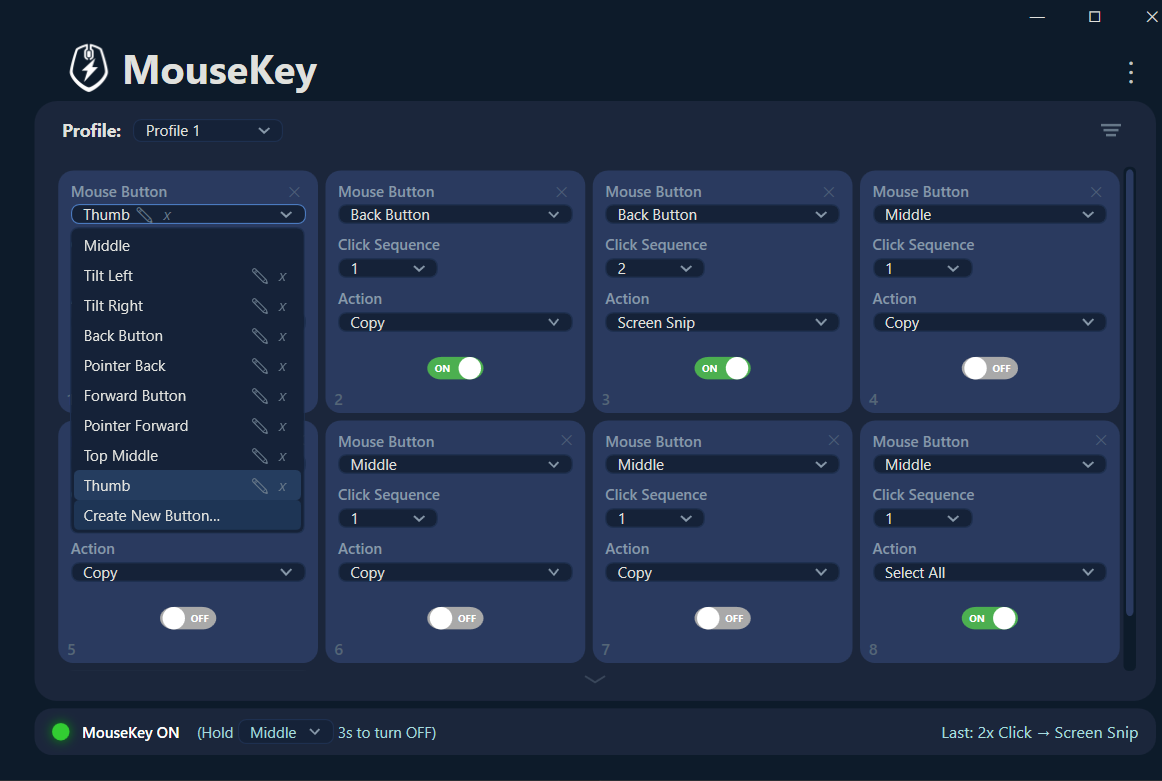
- Add button slots — click the + button in MouseKey to add a new slot. Select any mouse button from the dropdown.
- Assign actions — choose from built-in presets (Copy, Paste, Undo, Mute, Screen Snip, etc.) or select "Create Hot Key" to open the recorder and capture any keyboard shortcut or text string.
- Set click cadences — choose how many clicks trigger each action (1 through 5). Multiple slots on the same button with different cadence numbers gives you up to 5 distinct actions.
MouseKey runs in the system tray and uses minimal resources. There's no account to create, no cloud to sync with, and no recurring updates that break your configuration.
The bottom line
Logitech G Hub is a full-featured peripheral suite — and for users who need DPI tuning, RGB lighting, and firmware management specifically for Logitech devices, it serves its purpose. But for anyone who primarily needs mouse remapping, a fast macro recorder, and the flexibility to work with any mouse brand, MouseKey is a simpler, more stable, and more capable tool.
MouseKey gives you features G Hub doesn't have (click cadence actions, any-brand support, text string recording) while skipping the features most remapping users don't need (DPI curves, lighting, cloud profiles). The result is a tool that does less — but does what matters better.
Try MouseKey as your G Hub alternative
Mouse remapping for any mouse. Built-in hotkey recorder. Up to 5 actions per button. Set up in under a minute.
